

In This Issue
Why “the business” and “everyone” are not usable primary-user definitions.
How to separate users, buyers, approvers, beneficiaries, and affected people.
Why the person operating the interface may not be the person whose work matters most.
How to describe the change the system must create in an existing workflow.
A one-page primary-user brief to complete before writing requirements.
A proposed AI system is often described as being for the company, the department, or everyone involved in a process.
That sounds inclusive. It gives the design no centre.
Different people enter the workflow with different goals, information, authority, and exposure to failure. A system designed for all of them at once accumulates requirements without establishing whose outcome takes priority.
Before choosing a model, drawing an architecture, or writing a feature requirement, answer one question:
Whose work changes if this system exists?
Name one primary user and describe the change in that person’s work.
This does not mean ignoring everybody else. It creates a reference point for deciding which problem the first version must solve, which workflow it must fit, and what evidence will show that it helped.
“The business” is not a user
“The business needs faster reporting.”
“Operations needs more automation.”
“Employees need an AI assistant.”
Each statement names an organizational interest. None identifies the person encountering the problem.
An organization does not open the application, interpret a recommendation, correct an error, wait for an approval, or absorb the consequence of a bad decision. People do.
A useful primary-user definition is specific enough to reveal the work:
An account manager preparing for a customer renewal.
A support specialist deciding where to route an unfamiliar request.
A maintenance planner reviewing equipment history before scheduling work.
A security analyst investigating a new access anomaly.
A finance manager approving an exception to purchasing policy.
These descriptions identify a role, a decision, and a working context. They give the team somewhere concrete to observe, test, and measure.
Demographic detail is rarely the starting point. The relevant facts are what the person is trying to accomplish, what information they possess, what authority they have, and what constraints shape the task.
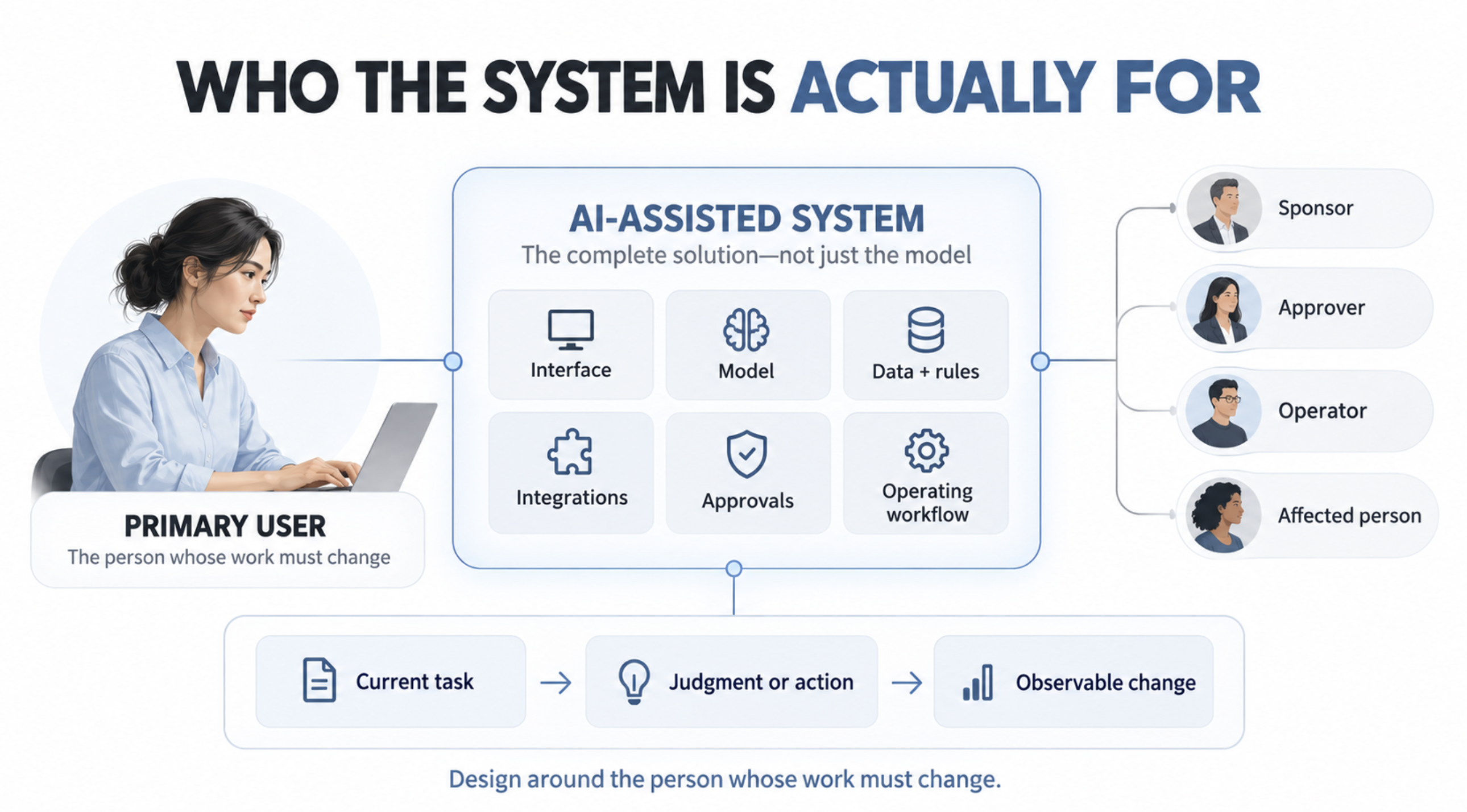
Separate the roles around the system
The person using the interface is not always the only person the system serves.
A workflow may include several roles:
Role | Relationship to the system |
|---|---|
Primary user | Performs the work the system is intended to improve. |
Secondary user | Uses the system or its output but is not the first design priority. |
Buyer | Controls the purchasing decision or budget. |
Sponsor | Wants the organizational outcome and supports the initiative. |
Approver | Authorizes a decision or action inside the workflow. |
Beneficiary | Receives value even if they never interact with the system. |
Affected person | Experiences a consequence of the system’s decision or action. |
Operator | Keeps the system running, monitored, and supported. |
One person may hold several of these roles. They should still be distinguished because their interests can conflict.
A buyer may want lower operating cost. The primary user may need enough time and evidence to make a careful decision. A sponsor may want increased throughput. An affected customer may need a way to challenge an incorrect outcome.
Calling all of them “users” makes those conflicts disappear from the design record.
Name one primary user without pretending there is only one
Choosing a primary user is a prioritization decision.
It does not mean that only one role matters or that the system will never serve anyone else. It means the first version has one person whose changed outcome determines whether the system is useful.
A broad workflow may require separate primary users for separate capabilities.
For example, an AI-assisted customer-support system could include:
A customer describing a problem.
A support specialist diagnosing and resolving it.
A supervisor reviewing escalations.
A knowledge manager maintaining approved guidance.
Trying to optimize one undivided system for all four roles will produce competing requirements. A better approach is to define the primary user for each bounded workflow.
If the first capability helps the support specialist resolve unfamiliar cases, design and measure that capability from the specialist’s work. The customer, supervisor, and knowledge manager remain important stakeholders with their own requirements and protections.
The primary user identifies the centre of one decision. It does not erase the surrounding system.
Start with existing work
A proposed system is easier to describe than the work it is meant to change.
Teams move quickly toward features:
A conversational interface.
Document retrieval.
Automated summaries.
Recommended actions.
An agent that completes the process.
These features say nothing about whether the user’s work improves.
Observe the current workflow before defining the future one.
Ask the primary user to walk through a real case. Record:
What starts the work.
What outcome the person is responsible for.
Which systems and documents they use.
What they need to know before deciding.
Where they wait, repeat work, or search manually.
Which exceptions require judgment.
What happens when information is missing.
Who reviews or receives the result.
How the person knows the work is complete.
This exposes the actual unit of work. It also shows whether AI is needed.
The problem may be poor access to existing information, unclear ownership, inconsistent source data, or an approval policy that requires unnecessary handoffs. Adding a model to those conditions can make the workflow look more advanced while leaving its constraint untouched.
Define the work change
A useful system changes something observable in the primary user’s work.
The change might reduce time spent finding information, improve the consistency of a decision, remove repetitive drafting, expose missing evidence earlier, or let the person handle a class of requests previously requiring escalation.
Write the change plainly:
For [primary user], when [situation occurs], the system helps them [perform a specific task or decision] using [required evidence or capability], so that [observable work outcome changes].
For example:
For a support specialist handling an unfamiliar account problem, the system retrieves the applicable customer history and approved guidance so the specialist can choose the next action without searching across four systems.
This statement is more useful than “build an AI customer-support assistant.”
It identifies who acts, when the need occurs, what the system contributes, and what work should change. It also creates questions the team can test:
Did the system retrieve the relevant history?
Was the guidance current and applicable?
Could the specialist choose the next action?
Did the number of system searches decline?
Did resolution quality remain acceptable?
The requirements can now follow the outcome instead of substituting for it.
Distinguish assistance from displacement
The work-change statement should also define which responsibility remains with the user.
A system might gather evidence while the user decides. It might recommend options while the user approves. It might execute routine cases and route exceptions to a person.
These are materially different designs.
Ask:
Which work should disappear?
Which work should become easier?
Which judgment must remain with the user?
Which new work does the system create?
Who handles uncertain or incorrect results?
Automation often removes a visible task while creating less visible work in review, correction, monitoring, and exception handling.
If the user now spends less time drafting but more time verifying unsupported claims, the workflow has changed without necessarily improving.
Measure the whole change in work.
Do not confuse the loudest stakeholder with the primary user
Requirements often come from the people with the most organizational authority.
Their input matters, but authority does not provide direct knowledge of the task.
A senior leader may describe the desired business outcome. A compliance team may establish constraints. Engineering may define what can be operated reliably. The primary user reveals how the work actually happens.
Good requirements need all of these perspectives, but they answer different questions:
Perspective | Question |
|---|---|
Sponsor | What organizational outcome justifies the investment? |
Primary user | What work must become meaningfully better? |
Governance | What must the system permit, prevent, and record? |
Operations | What must remain reliable under production conditions? |
Engineering | What design can satisfy these conditions? |
Starting with technology or stakeholder requests can produce a functional system that does not improve the primary user’s work.
Write requirements from evidence
Once the primary user and work change are clear, requirements become easier to evaluate.
Each requirement should trace to at least one of four sources:
A necessary step in the primary user’s workflow.
Evidence required for the user’s decision.
A constraint imposed by risk, policy, or operations.
A measurable outcome the system must improve.
A requirement without one of these sources deserves scrutiny.
“Include conversational search” may be a solution preference. “Let the support specialist retrieve the correct policy from a plain-language problem description” expresses a required capability. Conversational search may satisfy it, but other designs remain possible.
Requirements should preserve the problem long enough for the team to choose the simplest suitable solution.
The move
Before writing the next system requirement, complete a primary-user brief for one real workflow.
Define | Question |
|---|---|
Primary user | Who performs the work this system must improve? |
Situation | What event or condition starts the work? |
Responsibility | What outcome is this person accountable for? |
Current workflow | What do they do now, including searches, handoffs, and approvals? |
Decision | What judgment or action must they complete? |
Evidence | What information must be available and trustworthy? |
Work change | What becomes faster, safer, clearer, or newly possible? |
Retained authority | What must the user continue to decide or control? |
Failure consequence | Who is affected if the system is wrong? |
Success measure | What observable result would prove that the work improved? |
Then test the brief against one completed case from the current workflow.
If the team cannot identify the person, their responsibility, and the expected change in their work, delay the requirements. The system has not yet earned a specification.
Worth reading
Google’s People + AI Guidebook begins AI product design with the user, their values, the problem worth solving, and a definition of success. Its guidance treats user need and AI capability as separate inputs that must be aligned before the product is designed.
Takeaways
Name a person doing specific work, not an organization or broad audience.
Separate the primary user from the buyer, sponsor, approver, operator, beneficiary, and affected person.
Choose one primary user for each bounded workflow or capability.
Observe the current work before describing the future system.
Define the work change before selecting AI features.
State which decisions and authority remain with the user.
Trace requirements to workflow evidence, constraints, or measurable outcomes.
Stop requirements work when the team cannot explain whose work should improve.
If this helped you, leave a comment or your reaction. I’d like to hear where you landed.
INVENEW helps tech builders, operators, founders, and leaders turn AI from experiments into working systems.
Sponsored
This on demand webinar from Amazon Web Services (AWS) webinar, explores how AI is automating test generation, identifying vulnerabilities, and elevating performance testing across modern continuous integration and continuous delivery (CI/CD) pipelines. Watch now to see how gen AI is transforming verification into a strategic advantage by reducing time to release while improving reliability and compliance.
The Physical AI Boom Reaches The Farm

The future of farming relies on autonomous robots rather than herbicides. Greenfield Robotics has spent six years developing its technology, with 82 robots deployed across 16 states. Invest now for up to 20% bonus shares.
This Reg A+ offering is made available through StartEngine Primary, LLC, member FINRA/SIPC. Please read the Offering Circular and related disclosures before investing. This investment is speculative, illiquid, and involves a high degree of risk, including the possible loss of your entire investment.
Note: Third-party company and product names belong to their respective owners and are used for identification and illustrative reference only.