
The signal
Vector databases have become one of the most discussed parts of the AI application stack.
The reason is simple: modern AI apps often need access to information outside the model.
A model can generate, reason, summarize, and respond. But it does not automatically know your documents, product catalog, support history, internal knowledge base, user preferences, previous interactions, or domain-specific context.
That is where vector databases fit.
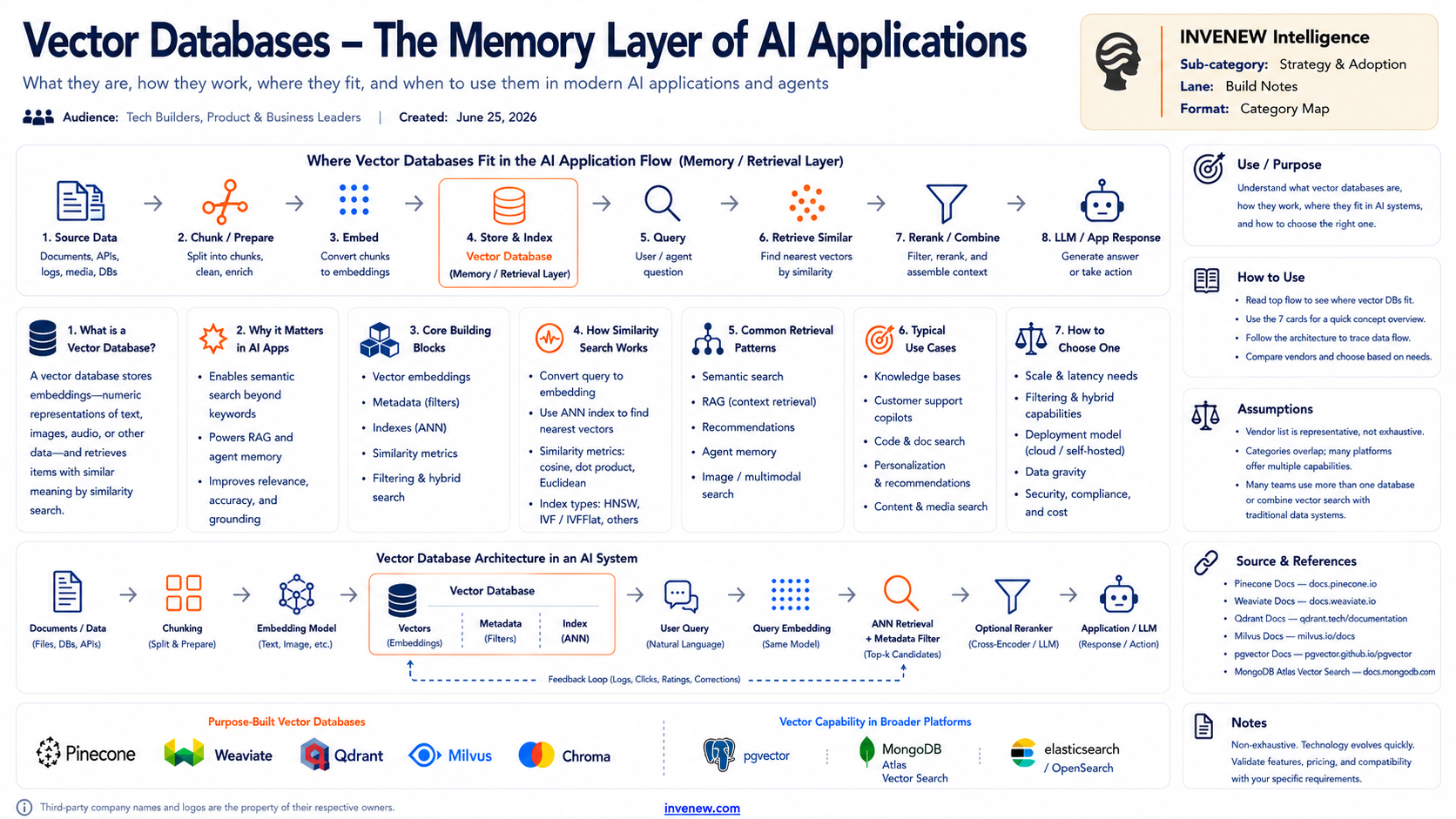
They store embeddings, numeric representations of text, images, audio, or other data, and help retrieve items with similar meaning. Instead of searching only for exact words, the system can search for related meaning.
For builders, this makes vector databases especially useful for retrieval-augmented generation, semantic search, recommendations, knowledge assistants, customer support copilots, code and documentation search, and certain forms of agent memory.
The important point: a vector database is not “the AI brain.” It is a retrieval layer.
Why it matters
AI apps become more useful when they can retrieve the right context at the right moment.
Without retrieval, many applications depend too heavily on the model’s general training data or on whatever context fits into a prompt. That can work for simple demos, but it becomes limiting when the app needs current, private, specific, or structured knowledge.
A vector database helps answer a practical question:
What information should the model see before it responds or acts?
That matters for:
grounding answers in relevant source material
searching large document collections
retrieving similar examples or past cases
adding memory to assistants and agents
improving recommendations
reducing hallucination risk through better context
connecting AI apps to business-specific knowledge
The value is not the vector database by itself. The value is the retrieval workflow around it.
The builder/operator view
A basic vector database workflow has eight steps.
1. Source data
The process starts with data: documents, PDFs, web pages, APIs, databases, logs, tickets, messages, media, or internal knowledge sources.
The first design question is whether the data is useful, current, permitted, and worth retrieving.
2. Chunk and prepare
Large documents are usually split into smaller chunks.
This step matters more than many builders expect. Bad chunking creates poor retrieval. Good chunking preserves meaning, context, headings, metadata, and useful boundaries.
3. Embed
Each chunk is converted into an embedding using an embedding model.
The embedding captures semantic meaning in numeric form. Similar ideas should sit closer together in vector space.
4. Store and index
The embeddings are stored in a vector database or vector-capable data platform.
The index helps retrieve similar vectors quickly, even across large collections. Common index approaches include approximate nearest-neighbor methods.
5. Query
When a user asks a question, the query is also converted into an embedding.
The system then searches for nearby vectors that are semantically similar to the query.
6. Retrieve similar items
The vector database returns the most relevant chunks or records.
This is where metadata filters matter. A good system may filter by user, tenant, document type, permission, date, product, region, or source before or during retrieval.
7. Rerank and combine
Retrieved results may be reranked, filtered, deduplicated, or combined with keyword search.
This is often where quality improves. Basic vector search may find “similar” material, but not always the most useful material for the answer.
8. LLM or app response
The application sends the retrieved context to the model or uses it inside a workflow.
The model then answers, summarizes, reasons, recommends, or triggers an action using the retrieved context.
What to watch
1. Vector search is not always enough
Similarity search is useful, but many applications need hybrid retrieval: vector search plus keyword search, filters, metadata, permissions, reranking, and sometimes relational queries.
Semantic similarity alone does not guarantee correctness.
2. Metadata will decide retrieval quality
Metadata is the quiet architecture layer.
Without metadata, the system may retrieve the right kind of text from the wrong document, wrong user, wrong customer, wrong time period, or wrong access boundary.
For serious AI apps, metadata is not optional.
3. Agent memory needs clearer design
Many people use “memory” loosely.
Agent memory may include conversation history, user preferences, task state, tool outputs, documents, decisions, corrections, feedback, and long-term knowledge.
Not all of that belongs in a vector database. Some memory belongs in relational stores, document stores, logs, caches, or event systems.
4. Vector databases will increasingly blend into broader platforms
Purpose-built vector databases are useful, but vector search is also appearing inside broader databases, search engines, and data platforms.
Builders should decide whether they need a specialized vector database or vector capability inside an existing stack.
5. Retrieval needs evaluation
A RAG system is only as good as what it retrieves.
Builders should test whether the system finds the right context, ignores irrelevant context, respects permissions, handles freshness, and improves answer quality.
The evaluation loop matters as much as the database choice.
Practical takeaway
Use a vector database when your application needs to retrieve information by meaning.
Good use cases include:
knowledge bases
RAG and document Q&A
customer support copilots
semantic search
recommendations
agent memory
code and documentation search
image or multimodal search
content and media discovery
But do not add one automatically.
Start with four questions:
What information does the AI app need to retrieve?
Is semantic similarity better than keyword search or SQL for this use case?
What metadata, permissions, and filters are required?
How will retrieval quality be tested and improved?
If the answers are unclear, the problem may not be the database yet. It may be the data model, access pattern, or workflow design.
INVENEW Lens
Vector databases are a useful example of how AI infrastructure and AI application design now overlap.
They sit in the stack, but their value shows up in the user experience: better answers, better search, better memory, better recommendations, and more grounded agent workflows.
For INVENEW Intelligence, the important lesson is architectural: do not treat vector databases as magic memory.
Treat them as a retrieval layer with clear inputs, metadata, access rules, ranking logic, evaluation, and feedback loops.
For INVENEW Labs, this topic is a strong candidate for a practical tool test or decision framework: compare purpose-built vector databases and vector-capable platforms by retrieval quality, filtering, latency, cost, developer experience, hosting model, and fit with real AI app workflows.
The goal is not to pick the trendiest vector database.
The goal is to choose the retrieval architecture that helps the application work.
Note: Third-party company and product names belong to their respective owners and are used for identification and illustrative reference only.
INVENEW exists to help tech builders, operators, founders, and leaders turn AI from experiments into working systems.