

In This Issue
What an AI demo proves and what it leaves untested.
The hidden conditions that make prototypes look production-ready.
Why strong outputs can conceal weak system design.
How to expose production constraints before they force a rebuild.
A practical test for deciding whether a demo is ready to advance.
The demo works.
The prompt produces a strong answer. Retrieval finds the right document. The agent calls the correct tool. The result appears in seconds.
Then the system reaches production.
Users submit incomplete requests. Source data has changed. Permissions differ by account. Several requests arrive together. A vendor call times out after the first tool has already changed something. The output still looks confident.
The demo proved that one carefully prepared path could succeed.
Production asks a different question:
Will the system continue to produce acceptable outcomes when it no longer controls the conditions?
That distinction determines whether a demo is evidence of a viable system or only evidence that the idea can work once.
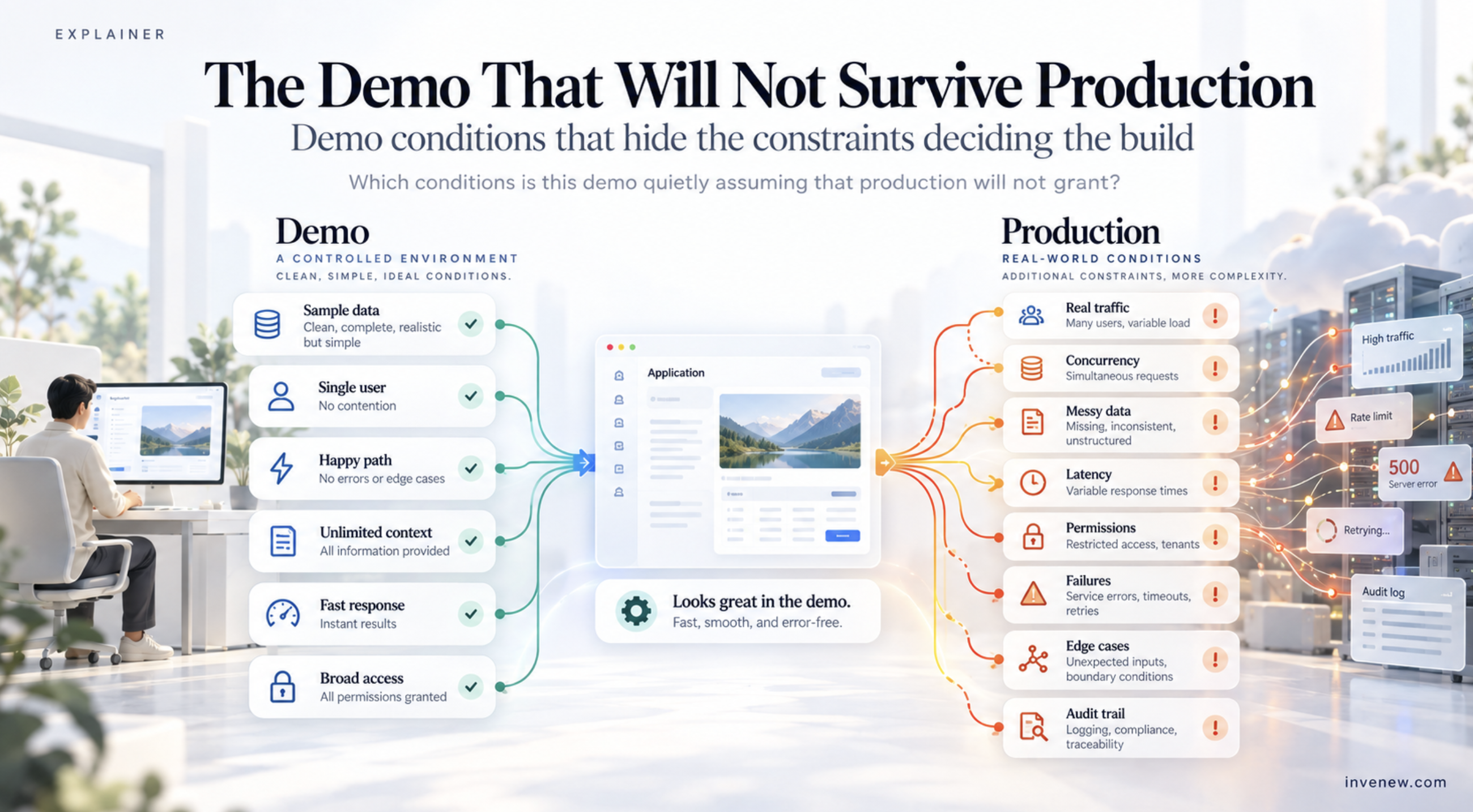
A demo is a controlled argument
A useful demo establishes possibility.
It shows that a model can perform a task, that components can be connected, or that a proposed workflow can create value. It helps people see the product before the entire product exists.
This is legitimate. A demo should be smaller than a production system.
The problem begins when the conditions making the demo successful remain unstated. The team sees the result but does not see the preparation, exclusions, retries, manual corrections, or environmental assumptions behind it.
A demo often benefits from:
A carefully selected input.
A knowledgeable person operating it.
Clean source material.
One user at a time.
Broad permissions.
A stable external service.
Manual recovery after failure.
No binding latency target.
No measured operating cost.
No need to explain what happened later.
None of these conditions is inherently wrong. Each becomes dangerous when the team assumes production will grant it.
The happy path is only one path
Demo design naturally favors the happy path.
The user asks the kind of question the system was built to answer. The necessary data exists. The model interprets the request correctly. Each integration responds. The final answer fits the desired format.
Production contains inputs the designer did not select.
Users will ask questions outside scope, combine several requests, omit required information, provide contradictory details, use unfamiliar terminology, and expect the system to remember something that was never stored.
The application therefore needs more than a successful path. It needs explicit behavior for:
Unsupported requests.
Missing or conflicting information.
Low-quality retrieval.
Unavailable tools or data sources.
Partial completion.
Uncertain outputs.
Actions that require approval.
Requests the user is not authorized to make.
Recovery after an external action has begun.
A demo can stop when the ideal path stops. A production workflow has to decide what happens next.
Curated inputs hide the real distribution
A demonstration usually uses examples that are available, understandable, and likely to show the intended capability.
Production inputs come from a wider distribution.
A document workflow demonstrated on clean digital PDFs may later receive scans, photographs, outdated templates, missing pages, handwriting, duplicated records, and documents in unexpected languages.
A support agent demonstrated with direct questions may encounter long histories, sarcasm, copied email threads, several issues in one message, or customers using internal product names incorrectly.
The relevant evaluation set must represent those conditions. It should include ordinary cases, difficult cases, edge cases, and cases the system should refuse or escalate.
Testing only the examples that shaped the prompt measures familiarity with the demo rather than general performance.
A skilled operator can be part of the illusion
The person running the demo usually understands the system.
They know how to phrase the request, which file to upload, which sequence to follow, and when a weak answer deserves another attempt. They may unconsciously avoid actions that expose unfinished behavior.
This operator is performing work the production interface has not yet absorbed.
Watch what the demonstrator does between the visible steps:
Rephrases a request before submitting it.
Selects the right source manually.
Restarts the session to clear state.
Ignores an incorrect intermediate result.
Retries until the preferred output appears.
Interprets an ambiguous status.
Corrects formatting before showing the result.
Each intervention is evidence of a missing product function, operating instruction, validation rule, or recovery path.
The test is simple: give the workflow to someone who did not build it. Observe without coaching. The points where the person hesitates or requires help reveal assumptions embedded in the demonstrator rather than in the system.
Correct output can hide unsafe execution
A polished final answer says little about how safely the workflow produced it.
An agent may call several tools, update records, send messages, or create transactions before returning a summary. The summary can look correct even when an earlier action used the wrong account, duplicated an operation, or exceeded the user’s authority.
Production evaluation must inspect the execution path as well as the result.
For tool-using systems, ask:
Was the correct tool selected?
Were its arguments valid?
Was authorization checked outside the model?
Could the action be executed twice?
What happened when the tool timed out?
Was partial completion recorded?
Could the workflow resume safely?
Was the final summary consistent with the actions that actually occurred?
A demo usually emphasizes visible output. Production quality includes every state change that happened before the output appeared.
Single-user success hides system behavior
A local demonstration rarely reveals what happens under shared use.
Production adds concurrency, quotas, rate limits, queues, timeouts, retries, and contention for downstream systems. It also introduces separation requirements among users, customers, projects, and organizations.
A workflow that works with one shared memory store may leak or mix context under multiple users. A retrieval system that appears fast with a small index may slow as documents and filters grow. A tool integration that works sequentially may exceed rate limits when many sessions call it at once.
The production question is broader than whether the model can complete the task. It includes whether the entire system can complete it within acceptable latency, cost, isolation, and reliability limits.
These properties need separate tests. They cannot be inferred from output quality.
Demos often run with developer credentials or a service account that can access everything needed.
Production users should not inherit those privileges.
The system must determine which user is making the request, which tenant or organization owns the data, which tools that user may invoke, and which records each action may affect.
Prompts cannot enforce these boundaries. Instructions such as “only use documents belonging to this customer” depend on the model following a rule that should already be enforced by retrieval filters, identity, authorization, and application logic.
Before advancing the demo, repeat it with the narrowest realistic permissions. Then test a user who should be denied access.
A production control has not been established until the system can fail closed.
Manual recovery hides reliability work
During a demo, failure can be handled by restarting.
Production may have already created a side effect.
If a workflow successfully reserves inventory but fails before recording the confirmation, retrying the entire sequence may reserve it again. If an agent sends a message and loses the response, it may not know whether the action completed.
Every external action needs a defined failure model:
Can it be retried safely?
Can completion be verified?
Is an idempotency key available?
Can partial work be rolled back?
Where is the resume point stored?
When must a person intervene?
Reliable behavior is designed around ambiguous completion, not only explicit failure.
Unmeasured cost hides the operating model
A demo usually runs too few times to reveal its economics.
Production cost depends on request volume, input size, output size, retrieval, tool calls, retries, evaluation, storage, logging, and human review. A workflow that calls a large model several times may appear inexpensive during testing and become difficult to justify at sustained volume.
Latency behaves similarly. A single response of several seconds may be acceptable in a presentation but fail inside an interactive workflow or accumulate across a multi-step agent.
Measure cost and latency per completed task, not per model call. Include failed attempts, retries, supporting services, and review time.
The useful unit is the outcome the system delivers.
The move
Before promoting a demo, create a production-assumption ledger.
Demo assumption | Production question |
|---|---|
Inputs are clean | What malformed, incomplete, hostile, or out-of-scope inputs will arrive? |
The operator understands the system | Can an unfamiliar user succeed without coaching? |
Data is available and current | What happens when a source is missing, stale, contradictory, or unreachable? |
One request runs at a time | What changes under concurrent use, quotas, and rate limits? |
Credentials can access everything | How are identity, tenant boundaries, and permissions enforced? |
Every tool call succeeds | How does the workflow recover from timeouts and partial completion? |
The selected model stays stable | How are model, prompt, tool, and retrieval changes evaluated? |
Latency is acceptable | What is the maximum acceptable time for the complete task? |
Cost is negligible | What is the cost per successful outcome at expected volume? |
The final output looks right | Were the evidence, intermediate decisions, and actions also correct? |
Choose the three assumptions most likely to invalidate the design. Test those before adding features.
Use production-like permissions, unfamiliar users, representative data, injected failures, and realistic concurrency. Record the result as evidence, not as an impression from another demonstration.
If the system fails, the demo still served its purpose. It revealed what the production design must now address.
Takeaways
Treat a demo as evidence of possibility, not evidence of production readiness.
Write down the conditions that made the demonstration succeed.
Test representative, difficult, unsupported, and adversarial inputs.
Observe whether the operator is manually supplying missing product behavior.
Evaluate tool calls and state changes in addition to the final response.
Test with realistic identity, permissions, tenant boundaries, and concurrency.
Define recovery for timeouts, retries, and partially completed actions.
Measure latency and cost per completed outcome.
Test the assumptions most capable of forcing an architectural rebuild.
If this helped you, leave a comment or your reaction. I’d like to hear where you landed.
INVENEW exists to help tech builders, operators, founders, and leaders turn AI from experiments into working systems.
Sponsored
This on demand webinar from Amazon Web Services (AWS) webinar, explores how AI is automating test generation, identifying vulnerabilities, and elevating performance testing across modern continuous integration and continuous delivery (CI/CD) pipelines. Watch now to see how gen AI is transforming verification into a strategic advantage by reducing time to release while improving reliability and compliance.
Note: Third-party company and product names belong to their respective owners and are used for identification and illustrative reference only.