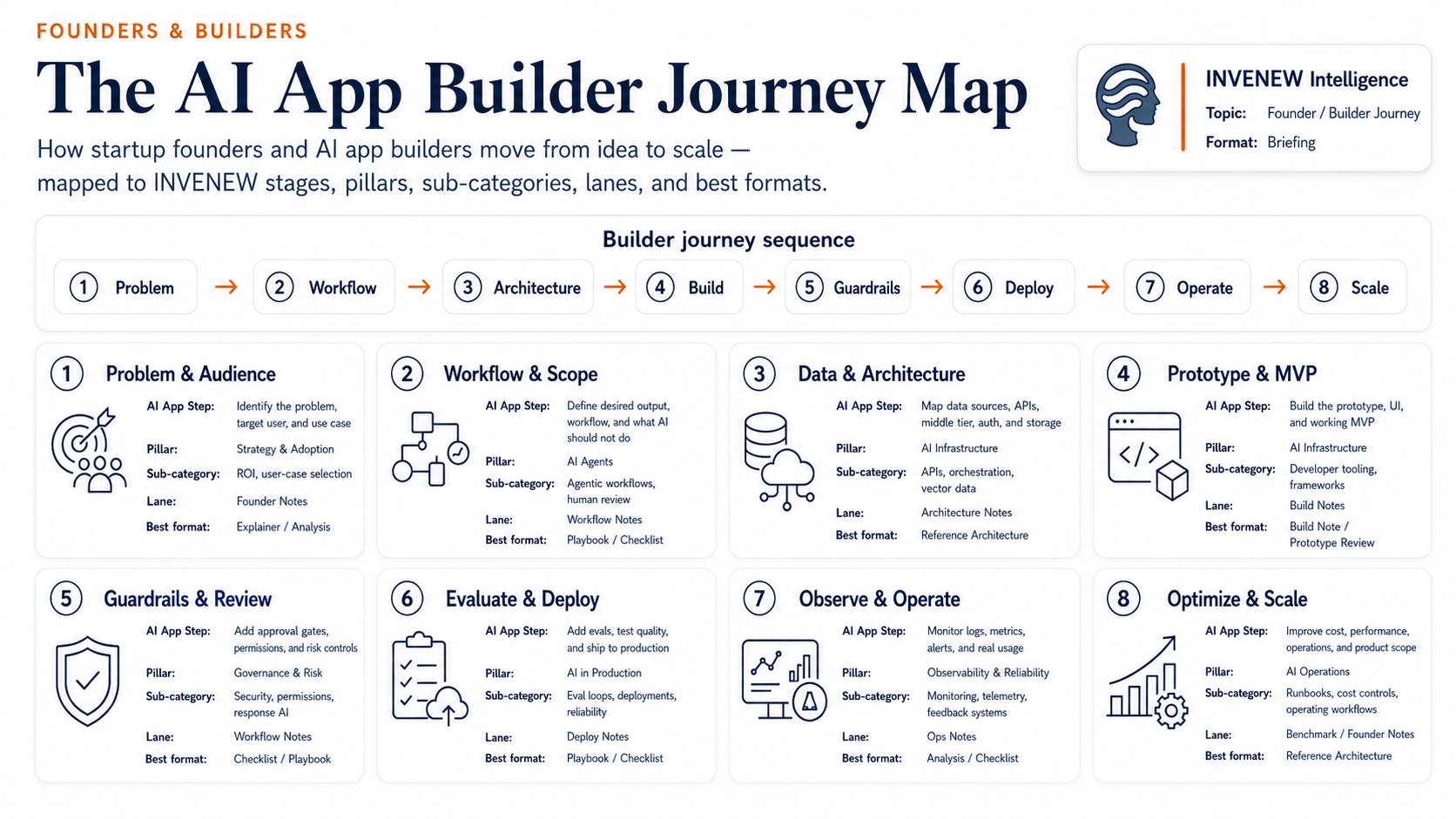

AI apps are easy to start and hard to finish.
A founder can open a coding tool, connect a model, generate a frontend, and produce something impressive in a day.
But a working AI-native app is not just a screen connected to a model.
It needs a clear problem.
It needs a useful workflow.
It needs data, APIs, auth, storage, and permissions.
It needs guardrails.
It needs testing.
It needs deployment.
It needs monitoring.
And eventually, it needs to scale without becoming too expensive, fragile, or risky.
That is where the AI App Builder Journey Map helps.
It gives founders and builders a simple sequence to follow:
Problem → Workflow → Architecture → Build → Guardrails → Deploy → Operate → Scale
Each step answers a different question.
1. Problem & Audience
The first step is not the model.
It is the problem.
Before building anything, ask:
Who is this for?
What are they trying to do?
Where are they stuck?
What is slow, painful, expensive, repetitive, or risky?
What would improve if this app worked?
A strong AI app usually starts with a specific user and a specific job.
Weak starting point:
“Let’s build an AI agent.”
Better starting point:
“Let’s help consultants turn messy client notes into a structured project brief.”
The goal of this stage is to avoid building a clever demo that nobody needs.
Builder question:
What real problem are we solving, for whom, and why does it matter?
2. Workflow & Scope
Once the problem is clear, define the workflow.
This is where you decide what the AI should actually do.
Should it summarize?
Draft?
Search?
Classify?
Recommend?
Generate code?
Call tools?
Update records?
Escalate to a human?
Just as important: decide what the AI should not do.
Many AI apps fail because the workflow is too broad. The system is expected to reason, act, remember, decide, and recover without clear boundaries.
A better approach is to define the job clearly:
Input → AI task → tool use → human review → output → next action
Builder question:
What should AI do inside the workflow, and where should humans stay involved?
3. Data & Architecture
After workflow comes architecture.
This is the step where the app becomes more than “frontend + AI model.”
A real AI-native app may need:
A user interface
An API or middle-tier layer
Authentication and permissions
A database
File storage
Prompt logic
Model calls
Tool calls
Vector search or retrieval
Background jobs
Logging
Human approval paths
Deployment infrastructure
You do not need all of this on day one. But you do need to know what the app may eventually require.
The purpose of architecture is to make the hidden system visible before it becomes messy.
Builder question:
What layers does this app need beyond the model call?
4. Prototype & MVP
Now you build the smallest useful version.
A prototype helps you test whether the idea can work.
An MVP helps you test whether a real user can use it.
Those are not the same thing.
A prototype can be rough. It can test the prompt, the workflow, the interface, or the model output.
An MVP needs enough structure for a user to complete the core job.
At this stage, avoid overbuilding. The goal is not to create the final product. The goal is to learn quickly.
Build only what proves the core workflow.
Builder question:
What is the smallest version that proves this app is useful?
5. Guardrails & Review
AI apps need boundaries.
Guardrails are not just for large companies. Even a small AI app needs basic rules around what the system can do, what it cannot do, and when a human should review the output.
Guardrails may include:
Approval gates
Permission limits
Source-of-truth rules
Sensitive-data handling
Output checks
Escalation rules
Audit logs
Fallback behavior
Human review for risky actions
This matters more when the app touches customers, money, private data, code, infrastructure, or published content.
The goal is simple: let AI do useful repeatable work, but keep judgment-heavy or risky decisions under human control.
Builder question:
Where should the app stop, ask, log, or escalate?
6. Evaluate & Deploy
An AI app is not ready because it works once.
It is ready when you understand how it behaves across different inputs, users, edge cases, and failure modes.
Before deploying, test:
Does the output help the user?
Does the workflow complete successfully?
What happens when the input is messy?
How often does the AI produce weak or wrong output?
What does it cost per run?
How long does it take?
When does it fail?
Can a human review or recover the workflow?
AI apps need evaluation because outputs vary. Traditional software testing is not enough.
Deployment should happen only after the builder has a basic understanding of quality, cost, latency, and risk.
Builder question:
What must be tested before real users depend on this app?
7. Observe & Operate
Once users arrive, the app enters a new phase.
Now the question changes from:
“Can it work?”
to:
“Can we see what is happening?”
AI apps need observability because problems are not always obvious. A workflow may appear successful while producing weak outputs, wasting tokens, calling the wrong tool, or failing silently.
Builders should track:
Errors
Logs
Model calls
Tool calls
Latency
Cost
User feedback
Failed tasks
Human escalations
Repeated issues
Output quality
Without visibility, you are guessing. With visibility, you can improve the app based on real behavior.
Builder question:
What do we need to monitor so we can improve the app after launch?
8. Optimize & Scale
Scaling an AI app is not just adding more users.
It means improving the system so it can handle more usage, more complexity, and more business value without becoming too expensive or unreliable.
At this stage, builders look at:
Cost per task
Model routing
Caching
Prompt improvements
Workflow automation
Reliability
Security
Support load
Infrastructure limits
New use cases
Product expansion
Sometimes scaling means adding features.
Sometimes it means removing complexity.
Sometimes it means turning a repeated workflow into a reusable product, template, or operating system.
The goal is to grow without letting cost, fragility, or risk grow faster than value.
Builder question:
What becomes expensive, fragile, or risky as usage grows?
The simple takeaway
The AI app journey is not one big build.
It is a sequence of decisions.
First, understand the problem.
Then design the workflow.
Then map the architecture.
Then build the smallest useful version.
Then add guardrails.
Then evaluate and deploy.
Then observe real usage.
Then optimize and scale.
Each stage has a different job.
Skip the problem stage, and you may build something nobody needs.
Skip the workflow stage, and the app becomes confusing.
Skip architecture, and complexity appears later.
Skip guardrails, and the system becomes risky.
Skip evals, and you ship blind.
Skip observability, and you cannot improve.
Skip operations, and scale becomes expensive.
The best AI-native builders do not simply ask:
“What tool should I use?”
They ask:
“Where am I in the journey, and what decision matters now?”
That is the value of the AI App Builder Journey Map.
INVENEW exists to help tech builders, operators, founders, and leaders turn AI from experiments into working systems.

Sponsored: In partnership with AWS