
Most agent projects start with enthusiasm.
Give the agent tools.
Give it memory.
Give it files.
Give it access.
Give it integrations.
Give it autonomy.
That is useful up to a point.
Then the agent becomes harder to trust.
Not because the model is useless. Because the environment around the model is messy.
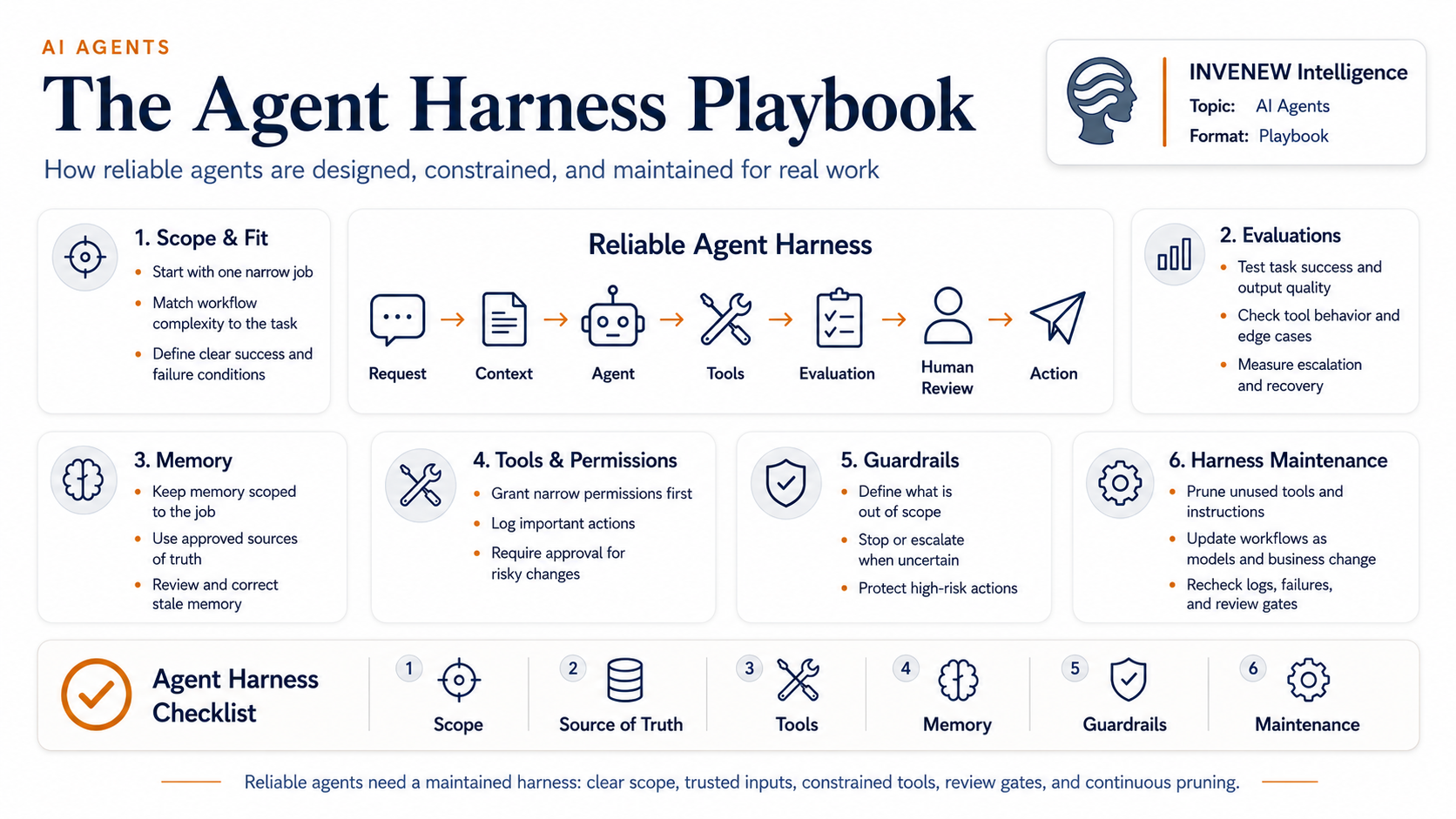
That environment is the agent harness.
The harness is everything around the agent that turns model capability into usable work:
– what the agent can read
– what it can remember
– what tools it can touch
– what actions it can take
– what it must not do
– what evidence it must return
– when a human must approve the work
– how errors are logged
– how the setup gets updated over time
A good agent is not just a smart model. It is a smart model inside a maintained operating system. The pasted source describes this as the “workbench” around the agent: the tools, memory, permissions, handoffs, review gates, and feedback that shape how the agent works.
The signal
The next phase of agent work is not just agent building.
It is agent maintenance.
Early agent design asks:
Can the agent do the task?
Mature agent design asks:
Can the agent keep doing the task safely as the model, workflow, tools, data, and business context change?
That second question is where most teams will struggle.
Because agents do not sit still.
They summarize.
They recommend.
They draft.
They route.
They update.
They sometimes act.
That means stale instructions, outdated docs, old approval rules, bloated tool lists, and unclear permissions become operational risks.
With normal software, stale documentation is annoying.
With agents, stale documentation becomes input.
The agent may read it, trust it, and produce work from it.
The playbook
A reliable agent harness needs five layers.
1. Scope
Start narrow. The agent should have one clear job before it gets more responsibility.
Bad scope: “Help with sales.”
Better scope: “Review inbound messages, classify them, draft a response, and flag anything that needs human review.”
The clearer the job, the easier it is to evaluate performance.
2. Source of truth
The agent needs current, trusted material.
That means documented workflows, approved examples, decision logs, policies, product notes, customer definitions, and escalation rules.
The key question:
What should the agent believe?
If the source material is stale, the agent will still sound confident. That is the risk.
3. Tools and permissions
Tools should be earned, not dumped into the agent.
Every tool needs a reason.
Ask:
– Does this tool help the core job?
– Does the agent know when to use it?
– Can misuse create damage?
– Is human approval required before action?
– Can the tool be removed without hurting the workflow?
More tools are not always more capability. Sometimes they are more confusion.
4. Guardrails
Guardrails are not just safety language in a prompt.
They are operating boundaries.
Useful guardrails include:
– read-only vs. write access
– approval before sending, publishing, deleting, or updating
– escalation rules for uncertain cases
– restricted data access
– required citations or evidence
– confidence thresholds
– audit logs
– human-in-the-loop checkpoints
The goal is not to slow the agent down. The goal is to keep the agent useful inside the right lane.
5. Maintenance
The harness needs review.
Not once. Repeatedly.
A good maintenance review asks:
– Which tools are unused?
– Which tools cause mistakes?
– Which instructions are outdated?
– Which workflows changed?
– Which source files are stale?
– Which human approvals are unnecessary?
– Which missing guardrails created risk?
– Did the model improve enough to simplify the harness?
– Did the business change enough to rewrite the workflow?
This is the underrated work.
The beginner instinct is to add.
The operator instinct is to prune.
Why this matters
Agent reliability is not only a model problem.
It is a systems problem.
The model may improve, but the harness can fall behind. A rule that helped a weaker model may constrain a stronger one. A tool that once helped may now create unnecessary choices. A workflow built around old business assumptions may keep producing old behavior.
That means agents can break in two directions:
They can fail because they are not capable enough.
They can also fail because the system around them was designed for a different model, a different workflow, or a different company.
That is why agent maintenance will become a real operating discipline.
What to watch
Expect stronger agent platforms to compete on the quality of the harness around the model:
– files
– memory
– tools
– approvals
– browser use
– terminals
– logs
– sandboxing
– permissions
– workflow controls
– integrations
– human review loops
These are not minor features. They are the operating surface that makes AI useful for real work.
For teams building custom agents, the decision is simple but important:
Use a platform-native harness and maintain less yourself.
Or build a custom harness and own more of the long-term upkeep.
Both can work.
But every custom tool, prompt, file, permission, and workflow becomes something that must be maintained.
Operator takeaway
Before adding another tool to an agent, run this checklist:
– What job is this agent responsible for?
– What source of truth should it follow?
– What tools does it truly need?
– What tools should be removed?
– What actions require approval?
– What evidence must it return?
– What should trigger escalation?
– What logs should be reviewed?
– How often will the harness be updated?
Reliable agents do not come from giving AI unlimited access.
They come from building a maintained workbench around a focused job.
That is how agents move from impressive demos to working systems.
INVENEW exists to help tech builders, operators, founders, and leaders turn AI from experiments into working systems.