
The signal
Most AI apps start with a model and a chat interface.
That is fine for a demo.
But useful AI systems need more than a model. They need access to tools, files, APIs, databases, business systems, prompts, user context, and approval flows.
That is where Model Context Protocol, or MCP, becomes important.
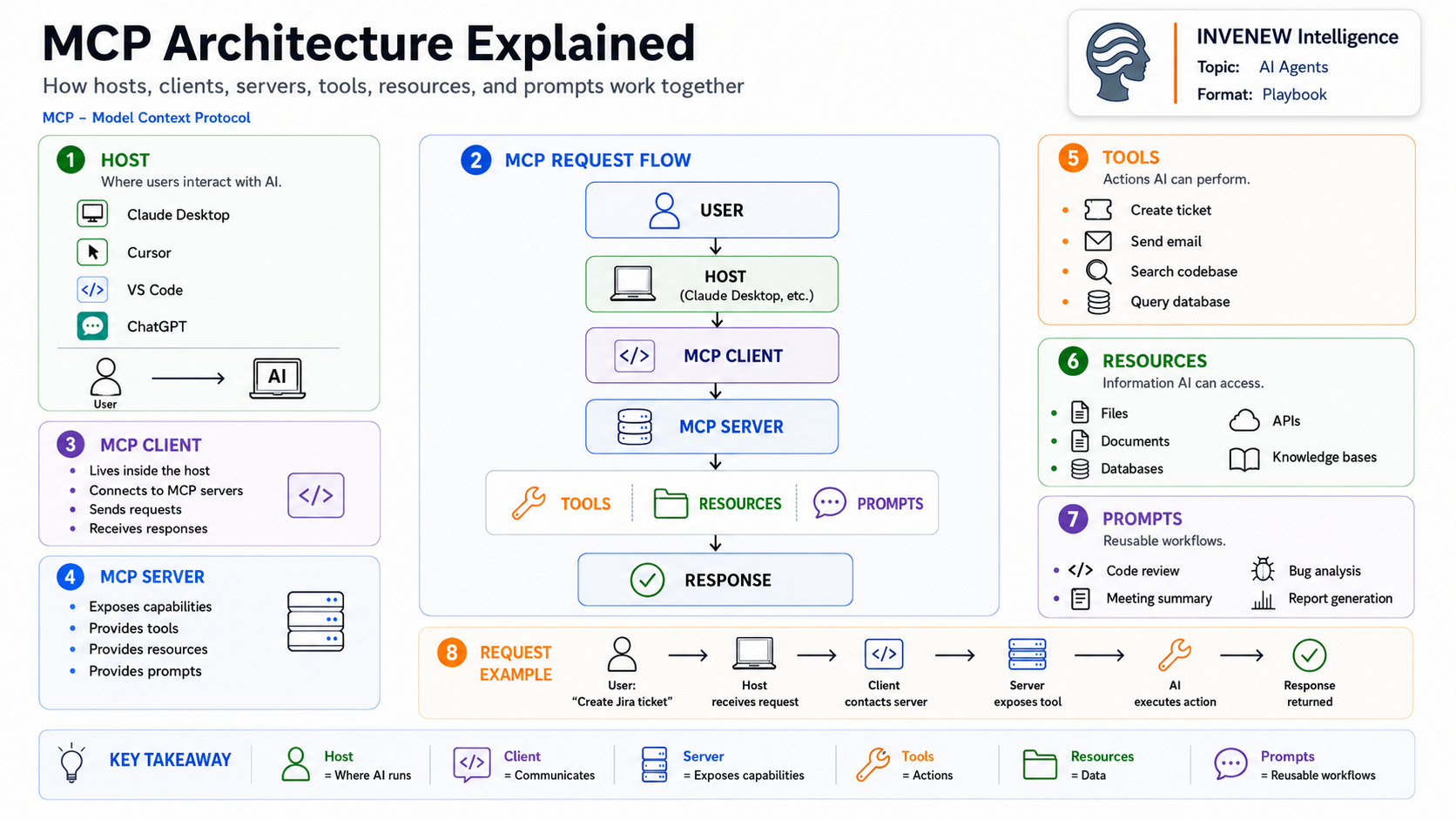
MCP is an open standard for connecting AI applications to external systems. In the official architecture, it follows a host-client-server model: the host is the AI application the user interacts with, the client manages the MCP connection, and the server exposes capabilities such as tools, resources, and prompts.
The attached diagram captures the core idea well:
Host = where the user interacts with AI
Client = the connector inside the host
Server = the capability layer
Tools = actions
Resources = data
Prompts = reusable workflows
Why it matters
MCP is not just another developer acronym.
It gives AI systems a more standard way to move from “answering questions” to doing useful work.
A model can generate text on its own. But to create a ticket, query a database, search GitHub, summarize a document, send an email, or retrieve internal knowledge, it needs a controlled connection to external systems.
MCP servers can expose three especially important capability types: tools for actions, resources for context and data, and prompts for reusable interaction templates.
That changes the design question for builders.
The question is no longer only:
“What model should we use?”
It becomes:
“What should the AI be allowed to access, what should it be allowed to do, and where should the control boundary sit?”
That is an architecture question.
The working model
A simple MCP request flow looks like this:
A user asks for something inside an AI host such as Claude Desktop, Cursor, VS Code, or another MCP-capable application.
The host uses an MCP client to communicate with an MCP server.
The server exposes the available capabilities.
The AI can then use a tool, retrieve a resource, or apply a prompt template.
The response flows back to the host.
That sounds simple, but the design implications are large.
A poorly designed MCP setup can create tool sprawl, weak authorization, unclear ownership, and unpredictable agent behavior.
A well-designed MCP setup creates separation:
The host owns the user experience.
The client owns the connection.
The server owns the capabilities.
The tools perform actions.
The resources provide context.
The prompts standardize repeatable workflows.
That separation is the point.
The builder takeaway
For builders, MCP should not be treated as a plug-in catalog.
It should be treated as an AI systems architecture layer.
Before adding MCP servers everywhere, answer five questions:
What should the AI be able to do?
Start with actions, not vendors. Create ticket, search repo, read docs, query database, update record.
What data should the AI be allowed to access?
Separate public docs, internal files, customer data, logs, source code, and production systems.
Where does approval belong?
Some tool calls can run automatically. Others need human review, especially write actions, financial actions, customer-facing messages, or production changes.
How will this be observed?
Tool calls need logs, errors, latency, success/failure states, and auditability.
Who owns each server?
Every MCP server should have an owner, a purpose, a permission model, and a maintenance path.
Without that discipline, MCP becomes another integration mess with a better name.
What to watch
MCP is moving from developer curiosity to infrastructure pattern.
The official documentation already describes MCP around lifecycle management, capability negotiation, server features, client features, authorization, and transports.
That means the next phase will not just be “more MCP servers.”
The next phase will be:
Better MCP governance.
Better tool design.
Better evaluation of tool calls.
Better permission boundaries.
Better observability.
Better human-in-the-loop controls.
The real winners will not be the teams with the longest list of connected tools.
They will be the teams that know exactly which tools belong in the workflow, what data they expose, what actions they permit, and how failures are handled.
INVENEW lens
MCP fits directly into the broader shift from AI experiments to working systems.
It sits between AI agents and the real world.
That makes it relevant across:
AI Agents
Tools & Infrastructure
AI in Production
INVENEW Labs practical setup includes:
Build a small MCP-style workflow.
Map the host, client, server, tools, resources, and prompts.
Add approval gates.
Add logging.
Measure where the workflow breaks.
That is where MCP becomes useful — not as a concept, but as a working system pattern.
Closing thought
MCP is the connection layer that helps the AI app reach the systems where work actually happens.
The model reasons.
The host interacts.
The client connects.
The server exposes.
The tools act.
The resources inform.
The prompts standardize.
That is the architecture to understand.
INVENEW exists to help tech builders, operators, founders, and leaders turn AI from experiments into working systems.
In partnership with
PEFT. Human-in-the-loop. Software factories. Seven days to ship. Every Wednesday, Gauntlet AI professors go deep on real AI engineering — live and free. Browse Sessions