
The signal
The next useful shift in AI is not just better prompting. It is better workflow design.
A prompt is useful when you need one answer. A workflow loop is useful when the same job keeps coming back. A control loop becomes useful when multiple workflows need to coordinate, stop, escalate, or hand off without turning the human into a full-time automation manager.
That is the practical difference between using AI as a tool and using AI as part of an operating system.
Most teams are still stuck at the prompt layer. They ask for a summary, a draft, a list, a plan, or a piece of code. That can save time, but it does not remove the recurring burden. The human still has to remember when to ask, what changed, which source to check, who needs the output, whether the answer is safe, and what should happen next.
That is where control loops matter.
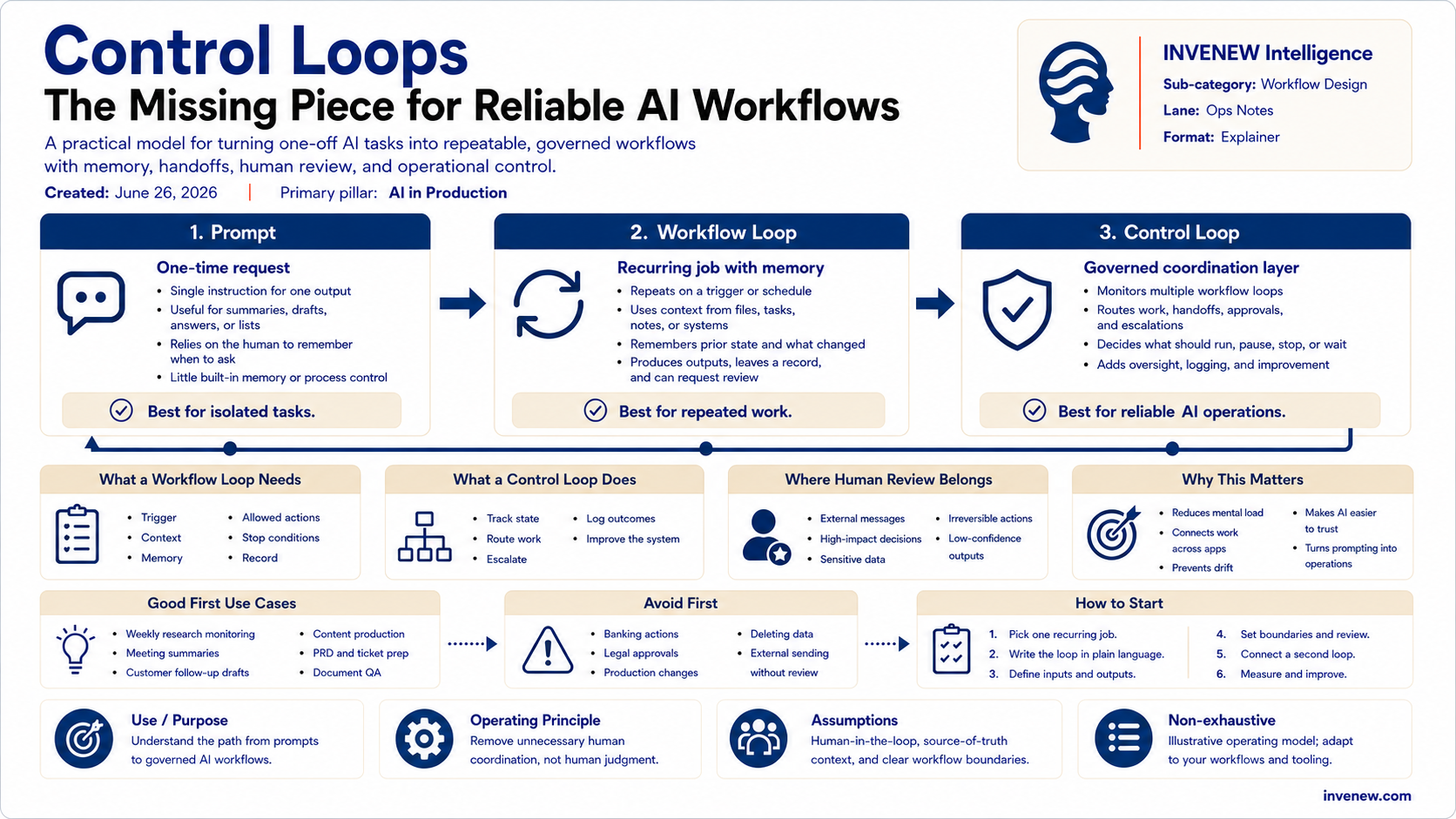
Prompts create outputs. Workflow loops manage recurring work. Control loops govern multiple workflows.
Why prompts are not enough
Prompts are the front door into AI, but they are not the whole system. A prompt says, “Summarize this meeting.” A workflow loop says, “Every time a customer call ends, capture the notes, extract the decisions, identify open questions, draft follow-up tasks, and prepare a customer update.” A control loop says, “Check whether the follow-up is safe to send, whether pricing needs approval, whether the support issue is already open, whether the customer is blocked, and whether a human needs to review before anything goes out.”
That is a different level of usefulness. The prompt gives you a result. The workflow loop gives you repeatability. The control loop gives you operational discipline.
Without that discipline, AI creates a new kind of work: managing the AI itself. You have to check whether it used the right source, remembered the latest decision, skipped an approval, invented a detail, or took the wrong action.
So the goal is not “more AI.” The goal is better loops.
The simple model
The practical model has three layers.
1. Prompt
A prompt is a one-time instruction: “Write a customer email,” “Summarize this transcript,” “Create a packing list,” or “Draft a PRD.” Prompts are useful, but fragile. They depend on the human to know when to ask, what to include, what changed, and what to do with the result.
2. Workflow loop
A workflow loop is a recurring job with memory. It has a trigger, inputs, context, rules, an action, an output, a review point, a record of what happened, and a next run. For example: “Every Monday, scan AI infrastructure news, group the signals by theme, compare them to our source-of-truth taxonomy, and draft a briefing outline.” A workflow loop removes repeated attention work because the human no longer has to restart the process from zero every time.
3. Control loop
A control loop manages multiple workflow loops. It asks: what changed, which loop should run, which loop should wait, which result needs human approval, which action is safe, which action is too risky, what should be logged, and what should stop. This is where AI workflows become operational rather than experimental.
The control loop is not there to make AI fully autonomous. It is there to make AI useful without becoming reckless.
Example: content production
Consider a simple AI-assisted publishing workflow.
At the prompt level, you ask: “Write a LinkedIn post about control loops.” That gives you one output.
At the workflow loop level, the system can read the source material, extract key lessons, compare them against editorial rules, draft a Briefing, draft a LinkedIn post, suggest a diagram concept, check whether the topic fits the content taxonomy, and leave a record of decisions.
At the control loop level, the system checks whether the draft followed approved positioning, used the right audience language, avoided deprecated terms, cited or grounded important claims, required human approval before publishing, matched the standard diagram layout, and stayed consistent across the Briefing, LinkedIn post, and visual.
Now the system is not just generating content. It is managing a governed workflow.
Example: customer follow-up
A prompt says: “Write a follow-up email to this customer.”
A workflow loop says: “After every customer call, summarize the call, identify promises, capture objections, draft next steps, and create a follow-up task.”
A control loop says: “Before sending anything, check whether pricing was mentioned, whether security questions require review, whether support tickets are open, whether the customer is at risk, and whether the response needs approval.”
This is where the model becomes useful for real operations. The AI should not blindly send the email. It should prepare the work, check the context, flag the risk, and bring the human in at the right point.
That is not less powerful. That is more useful.
What makes a good workflow loop?
A good workflow loop is not just automation with an AI label. It needs clear design.
First, it needs a trigger. Does it run on a schedule, when a file changes, when an email arrives, when a meeting ends, or when a task is overdue? Without a trigger, the human still carries the burden of remembering.
Second, it needs context. That may include documents, emails, meeting notes, customer records, tickets, previous decisions, brand rules, policies, or source-of-truth files. Weak context creates weak loops.
Third, it needs memory. A loop should not treat every run as the first run. It should know what happened last time, what changed, what remains open, and what has already been decided.
Fourth, it needs boundaries. What is it allowed to do? Can it summarize, draft, classify, compare, suggest, create a task, or update a document? Can it send a message, change pricing, modify production data, or trigger another system? Most early loops should prepare, organize, and recommend — not take irreversible actions.
Fifth, it needs stop conditions. It should stop when source material is missing, confidence is low, the action is sensitive, a policy conflict appears, or human judgment is required. A loop that never stops is not mature. It is dangerous.
Sixth, it needs a record. What did it read? What did it decide? What changed? What did it ignore? What needs review? What action did it take? Without a record, the human cannot audit or improve the system.
Finally, it needs to know who else should know. If the research loop finds a major signal, the publishing loop may need to know. If the sales loop finds a security objection, the product loop may need to know. Useful workflows do not live inside one app. They live between systems.
What makes a good control loop?
A control loop is the coordination layer. It does not simply run tasks. It governs them.
A good control loop tracks state: what is open, blocked, changed, approved, or waiting for review. It routes work: whether something needs research, drafting, legal review, customer response, engineering input, or human approval. It escalates when the action is high-impact, ambiguous, sensitive, irreversible, external-facing, or inconsistent with known rules.
It also logs what happened. The system should show what ran, what sources were used, what changed, what decision was made, and what still needs attention. Logging is not bureaucracy. It is how teams build trust in AI-assisted work.
Finally, a control loop improves the system over time. If the human keeps correcting the same issue, the loop should be updated. If a source is outdated, the loop should flag it. If the workflow creates too many approval requests, the control loop should be redesigned.
The goal is not to create a noisy AI assistant. The goal is to make the workflow cleaner over time.
Where teams should start
Do not start with the riskiest workflow. Do not start with banking, legal approvals, production access, or anything where a bad action creates serious damage.
Start with workflows that are recurring, tedious, easy to review, recoverable if wrong, useful if improved, and annoying enough to matter.
Good first candidates include weekly research monitoring, meeting summaries, content production, customer follow-up drafts, internal status updates, product use-case collection, PRD preparation, ticket creation, competitive signal tracking, inbox triage, document QA, and knowledge-base updates.
These workflows create real leverage without handing the system too much power too early.
The first goal is not autonomy. The first goal is reliability.
The implementation pattern
Start by picking one recurring job. Choose something that keeps coming back, such as weekly research, customer follow-up, content production, product planning, or internal reporting.
Next, write the loop in plain language. For example: “When a new transcript is added, read it, extract the key points, identify the practical lessons, compare them against the content taxonomy, draft a Briefing outline, and flag anything that needs fact-checking.”
Then define the inputs. The loop may need a transcript, decision log, taxonomy, customer notes, CRM record, calendar entry, ticket history, product roadmap, brand rules, or prior drafts. The loop is only as good as the context it can reach.
After that, define the output clearly. Do not say, “Create something useful.” Say, “Create a 900-word Briefing with a signal section, practical model, implementation steps, risks, and final takeaway.” Clear outputs make loops easier to review.
Then define the boundaries. The loop may be allowed to summarize, draft, classify, compare, suggest, create a task, and flag a risk. It may not be allowed to send external messages, change pricing, commit code to production, delete data, approve contracts, or modify financial records.
Finally, define the review point and the log. Decide when the human comes in: before publishing, before sending a customer message, before updating a source-of-truth file, before escalating to a client, or before changing a ticket status. Each run should also leave a small record of what triggered the loop, what sources were used, what changed, what output was created, what was blocked, and what should happen next.
Once the first loop works, connect a second loop. The research loop can feed the briefing loop. The briefing loop can feed the LinkedIn loop. The LinkedIn loop can feed the diagram loop. The publishing loop can check all outputs before release.
That is how you move from a workflow loop toward a control loop.
The operating principle
A control loop should not remove the human. It should remove unnecessary human coordination.
That distinction matters.
The human should still make judgment calls, approve sensitive actions, and own the system. But the human should not have to remember every recurring step, reassemble context from five apps, check the same sources repeatedly, and manually coordinate every handoff.
That is the work control loops can reduce.
The risk
The biggest risk is not that AI fails loudly. The bigger risk is that AI appears useful while quietly drifting.
It may use the wrong source, skip a decision rule, treat an old document as current, produce a confident answer without enough evidence, or create a polished draft that does not match the actual operating model.
This is why control loops matter. They create a structure for checking, stopping, logging, and escalating.
The more powerful the AI workflow, the more important the control layer becomes.
The takeaway
The future of practical AI work is not just prompt engineering. It is workflow engineering.
Prompts are still useful, but they are only the beginning. The real leverage comes when teams turn repeated work into workflow loops, then govern those loops through control loops.
The model is simple:
Prompt → Workflow Loop → Control Loop
The prompt creates the first output. The workflow loop makes the work repeatable. The control loop makes the system safer, more coordinated, and easier to trust.
That is the practical path from using AI occasionally to building AI-native operations.
INVENEW exists to help tech builders, operators, founders, and leaders turn AI from experiments into working systems.