

In This Issue
Anthropic Labs launched Claude Design, a conversational tool for producing prototypes, decks, and one-pagers
Why the design-system-from-codebase feature matters more than the generation feature
Who should adopt it now, who should wait, and what a research preview label actually means for your workflow
The handoff question: how output moves to Canva, Gamma, Vercel, and Claude Code
What to check before you let it touch your brand
The signal
In April, Anthropic Labs released Claude Design, a product that turns a text prompt into visual work: interface prototypes, slide decks, one-pagers, and marketing collateral. It runs on Claude Opus 4.7 and ships as a beta included with Claude Pro, Max, Team, and Enterprise plans.
The launch is a signal beyond the product itself. Anthropic is moving from model provider into the application layer, and it is doing so at the stage of the builder journey where most teams lose the most time: the stretch between having an idea and having something you can put in front of another person.
What it is
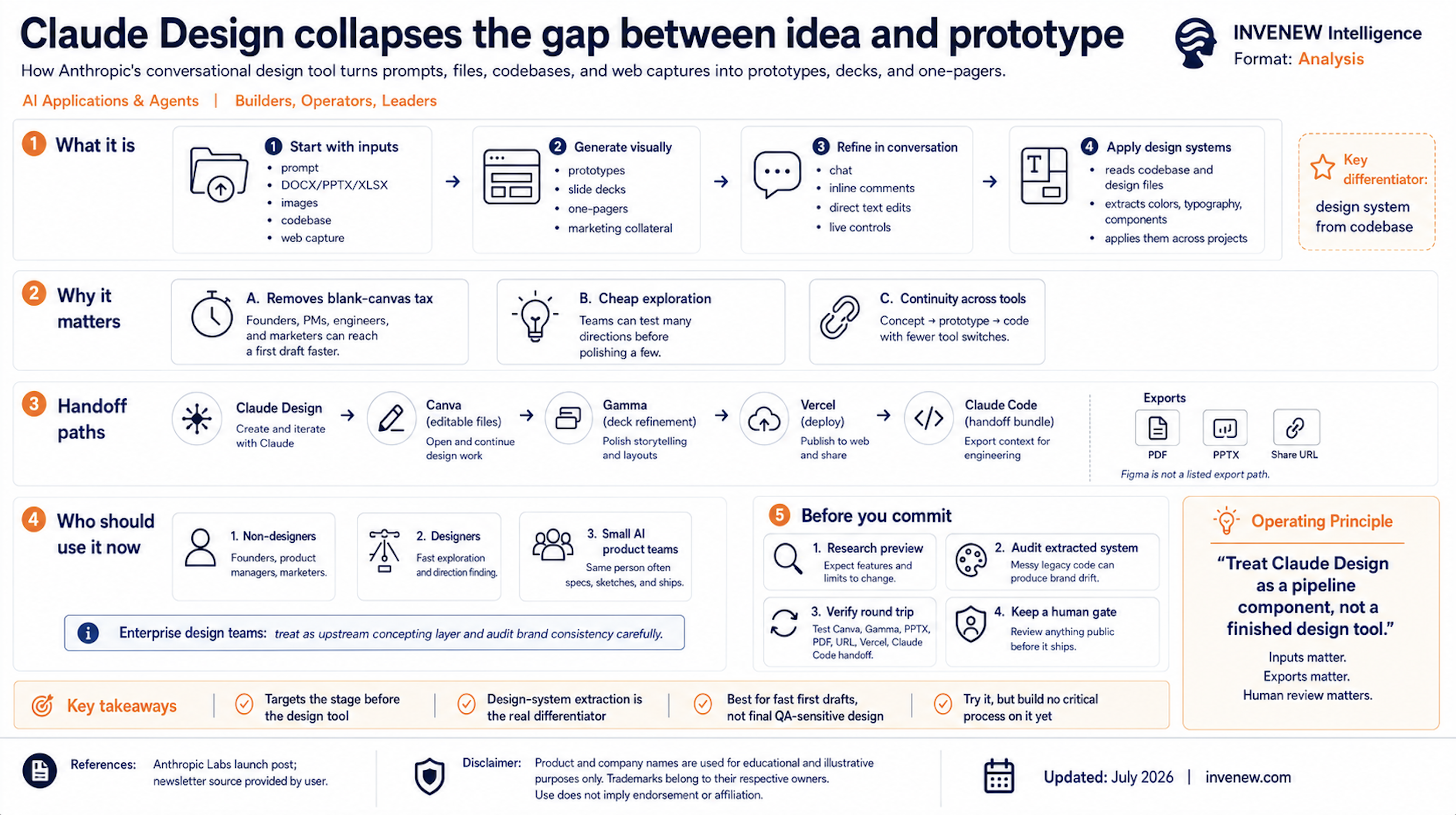
Claude Design is a visual work surface driven by conversation. You describe what you need, Claude generates a first version, and you refine it through four channels: chat, inline comments on specific elements, direct text editing, and adjustment controls that Claude generates for the specific design so you can tweak spacing, color, and layout live.
The input surface is wide. You can start from a prompt, upload documents in DOCX, PPTX, or XLSX format, upload images, point it at a codebase, or use a web capture tool to pull elements from your existing site so prototypes match the real product.
The feature that separates it from prompt-to-image tools is the design system. During onboarding, Claude reads your codebase and design files and builds a design system for your team: colors, typography, components. Every subsequent project applies that system automatically. Teams can maintain more than one system and refine each over time.
Output moves outward through several paths: PDF, shareable URL, PPTX export, a push to Canva where files arrive fully editable, an integration with Gamma for deck refinement, deployment to Vercel, and a handoff bundle for Claude Code when a prototype should become software.
Why it matters
The cost of visual work has never been the pixels. It has been the start. A product manager knows the flow but cannot lay it out. A founder has the story for a deck but no slides. An engineer can describe the interface but opens Figma and stalls. The blank canvas is a tax on every non-designer, and a rationing constraint on designers, who rarely have time to prototype a dozen directions and settle for exploring two or three.
Claude Design attacks that specific cost. It does not replace the design tool. Anthropic told TechCrunch the product complements Canva rather than competing with it, and the export paths back that claim: the workflow assumes your polished work still finishes elsewhere. The bet is narrower and smarter: own the stage before the design tool, where an idea becomes a first draft.
For teams already inside the Claude ecosystem there is a second effect. Prototype in Claude Design, hand the bundle to Claude Code, deploy through Vercel. That is a concept-to-shipped pipeline with fewer tool switches than most teams run today. Continuity between planning, design, and implementation is the actual product here. The visuals are the visible part.
Who should use it
Three groups map cleanly to it. Non-designers who need to communicate visually: founders assembling investor decks, product managers mocking flows, marketers producing collateral without waiting on a design queue. Designers who want cheap exploration: generating eight directions in an afternoon and keeping the two worth real work. And small teams building AI products, where the same person often writes the spec, sketches the interface, and ships the code.
Enterprise design teams with mature systems in Figma should treat it as an upstream concepting layer, and evaluate the design-system import carefully before trusting it with brand consistency.
When to use it, and when not to
Use it when speed to a shareable draft matters more than pixel precision: internal proposals, early prototypes, stakeholder walkthroughs, first-pass decks, landing page concepts.
Do not use it as your system of record for brand assets, at least not yet. It is a beta product, and Anthropic itself says it is early and shipping improvements often. Do not use it for final production design where accessibility review, precise responsive behavior, or design QA is required. And do not point it at a codebase you are not comfortable having read for system extraction until you have reviewed your data handling posture on your plan tier.
What to know before committing
Four checks before it enters your workflow.
First, the label. Research preview means the interface, limits, and behavior will change under you. Build no process that breaks if a feature moves.
Second, the design system extraction is only as good as what it reads. A clean codebase with consistent tokens will produce a usable system. A legacy frontend with three generations of CSS will produce a system you should audit line by line before letting it stamp your brand on anything public.
Third, the export story matters more than the generation story. Verify the round trip for your actual stack. If your team finishes work in Figma, note that Figma is not currently a listed export path. Canva, Gamma, PPTX, PDF, URL, and Vercel are.
Fourth, plan economics. It is included with paid Claude plans, which makes the marginal cost of trying it zero if you already subscribe. That also means usage draws from the same subscription capacity your team uses for everything else.
Operator takeaway
Treat Claude Design as a pipeline component, and evaluate it the way you would evaluate any component: inputs, outputs, failure modes. The input is your codebase and design files. The output is draft visual work plus handoff bundles. The failure mode is unreviewed brand drift reaching the public. The control is the same one that governs every AI surface in your operation: a human gate before anything ships. If your team adopts it, decide now which artifacts may leave the building without design review and which may not.
Builder takeaway
The interesting adoption is the concept-to-code path. Prototype the interface conversationally, refine it against your real design system, then hand the bundle to Claude Code and build against it. That collapses the spec-to-mockup-to-implementation relay into one thread. Start with one internal tool or one landing page. Measure the time from idea to deployed draft against your current process. That number, and the quality of the extracted design system, will tell you whether this belongs in your stack.
Worth reading
Anthropic's own launch post explains the design system onboarding and the sharing model in more detail than the press coverage does: https://www.anthropic.com/news/claude-design-anthropic-labs
Takeaways
Claude Design targets the stage before the design tool: idea to first shareable draft.
The design system built from your codebase is the differentiating feature. Audit what it extracts before trusting it.
Export paths are Canva, Gamma, PPTX, PDF, URL, Vercel, and a Claude Code handoff bundle. Figma is not on the list.
It is a beta included with paid plans. Try it at zero marginal cost, but build no critical process on it yet.
Keep a human review gate between generated visuals and anything public.
Where does visual work stall in your team today: before the first draft exists, or after it does? Reply and tell me which stage costs you more.
Note: Third-party company and product names belong to their respective owners and are used for identification and illustrative reference only.
INVENEW exists to help tech builders, operators, founders, and leaders turn AI from experiments into working systems.
In partnership with
See the whole platform. No guided tour.

Skip the sales call. Walk through Gladly's interface yourself — the AI suggestions, the unified customer view, the full conversation thread. 15 minutes, no installation, no commitment.