
The signal
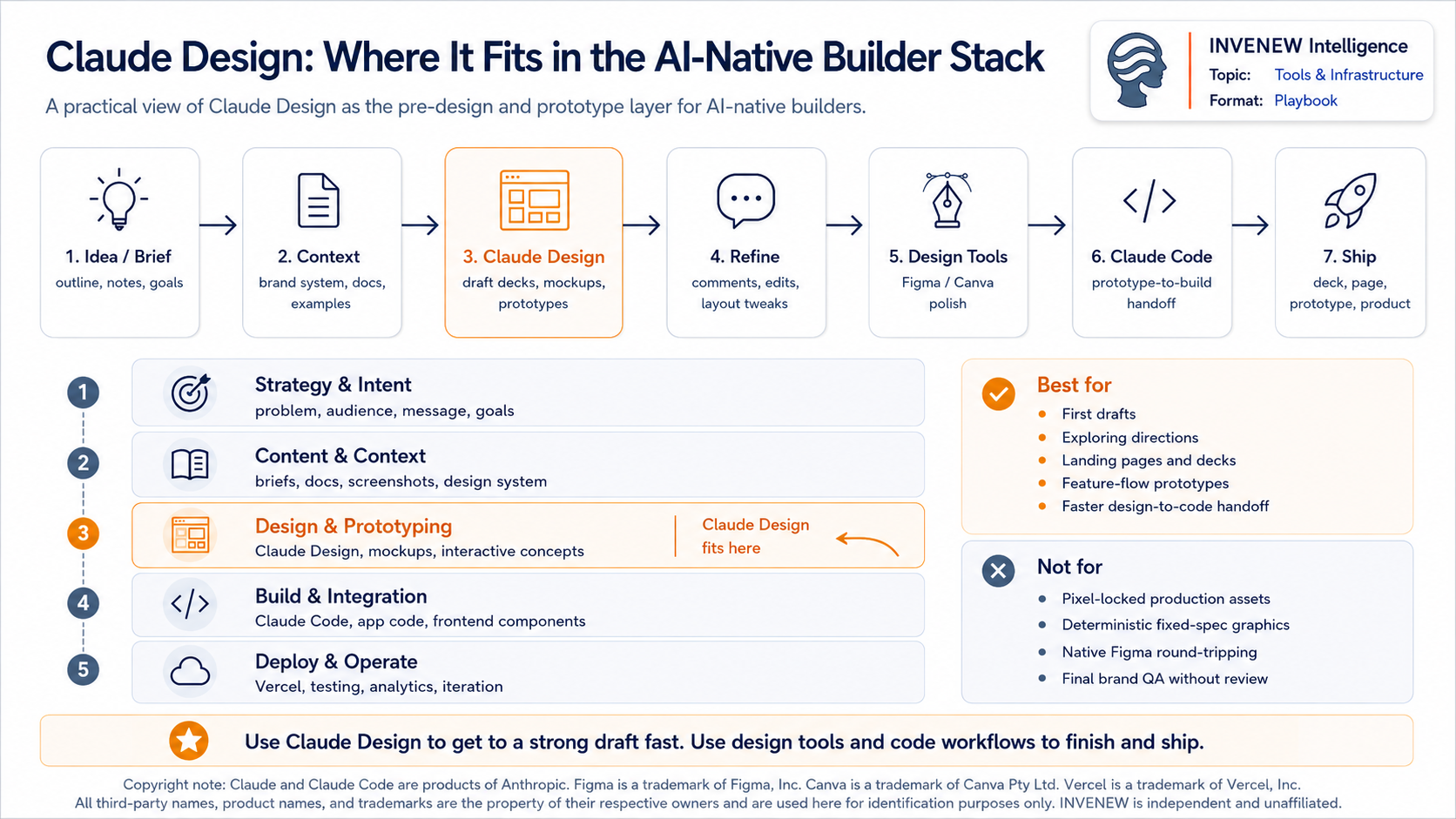
Claude Design is a conversational canvas where you describe a deck, prototype, landing page, or visual concept in plain language and Claude builds a first draft you can refine through chat, comments, and direct edits.
It is not a Figma or Canva replacement. It is the step before you open those tools.
If you have ever lost a morning getting from “I know roughly what I want” to “there is something on screen we can react to,” that gap is the problem this tool is built for.
For AI-native builders, that matters because more work now starts as rough intent:
A founder deck.
A product flow.
A landing page idea.
A feature mockup.
A visual explanation.
A prototype that needs to become code.
Claude Design gives that early-stage idea a shape faster.
What it is
Claude Design is an Anthropic Labs product, currently in beta, that pairs a chat panel with a live visual canvas.
You prompt.
Claude renders.
You iterate.
It can produce decks, interactive prototypes, slides, one-pagers, product mockups, marketing collateral, and front-end concepts.
Two design choices matter for how builders will actually use it.
First, the output is a live code state, not a flat image. You can select a single component and change it without regenerating the whole canvas.
Second, it is brand-aware. You can import a design system once and Claude can build against your colors, components, and patterns instead of guessing from scratch.
Plain-English caveat: this is a complement to Figma and Canva, not a substitute. There is no native .fig import/export workflow to treat it like a full design-system hub.
Why it matters
Most visual work does not start in a design app.
It starts in a product review, a sales prep doc, a founder deck, or a half-formed idea that needs to become visible before a team can argue about it.
The cost is hidden.
Every hour spent reproducing what already exists, or stalling because no one wants to open a blank canvas, slows down the build.
Claude Design compresses that front end of the work.
For builders, the more interesting shift is the handoff to Claude Code.
A design here is not just a dead-end mockup. It can carry design intent directly into a coding tool. That is the line between “another canvas for static mockups” and “a starting point for real software.”
Who should use it
Designers
Use it to explore more directions before narrowing the work. Static mockups can become interactive prototypes faster.
Founders and solo operators
Use it to turn a rough outline into an on-brand pitch deck, one-pager, or landing page draft without starting from a blank canvas.
Product managers
Use it to sketch wireframes, feature flows, and product concepts before handing them to design or engineering.
Marketers
Use it for landing pages, campaign visuals, social assets, and draft collateral that a designer can later polish.
Engineers and founder-engineers
Use it as a prototype-to-build bridge, especially when the design can move into Claude Code without rebuilding from screenshots.
For an INVENEW-shaped operation, the natural users are the founder doing first-draft visual work and any future Product or Publishing agent role that needs decks, landing pages, or visual concepts drafted on brand.
When to use it
Reach for Claude Design when:
You need a first draft to react to, not a final asset.
You want to explore several directions before committing.
You are prototyping a feature flow you may hand to engineering.
You are turning an outline, old deck, doc, or research note into something visual.
You are preparing a landing page or deck that a designer will later polish.
The best use case is not “make me the final thing.”
The best use case is:
“Get me to a useful first version fast.”
When not to use it
Skip it when:
You need pixel-deterministic, reproducible output built to a fixed spec.
Your workflow depends on round-tripping with Figma.
The asset is final-form production work with strict brand QA and no human polish step.
For INVENEW, that means Claude Design is not the right tool for spec-locked, fixed-coordinate PNGs, fillable PDFs, or deterministic Python/PIL builds where reproducibility is the whole point.
Use Claude Design to explore.
Use the deterministic pipeline to ship.
What value it offers
Speed to first draft
The biggest value is getting from idea to visible artifact quickly.
Exploration without rationing
Instead of debating one direction too early, you can generate several directions and narrow from there.
Brand consistency
With a design system imported, Claude can work from real colors, type, components, and layout patterns instead of inventing a generic visual language.
Layered editing
Use chat for broad direction changes.
Use inline comments for specific feedback.
Use direct text edits for copy changes.
Use layout controls for spacing, alignment, color, and sizing without burning a model turn.
Real handoff
Export the work or hand it to the next tool in the workflow, including Claude Code when the design needs to become software.
Where to access it
Claude Design is not a separate app you download.
It is part of Claude.
You can access it through:
Web: claude.ai/design
Desktop: the Claude desktop app
It is included with Claude Pro, Max, Team, and Enterprise plans. It is not available on the free tier.
How to enable it
There is no installer.
The setup issue is access.
For individual Pro or Max users, sign in to Claude and open Claude Design from the left navigation or go directly to the Design page.
For Team and Enterprise users, Claude Design may need to be enabled by an organization admin in settings.
For governed teams, the important setup step is not just access. It is deciding which design system is approved, who can edit it, and what assets are safe to use inside the workspace.
The core workflow
The workflow is simple.
1. Add context
Start from a prompt or import existing material: a codebase, a web capture, a deck, a document, a spreadsheet, or design-system files.
2. Prompt the first draft
Describe the deck, prototype, landing page, or visual concept. Claude renders the first version on the canvas.
3. Iterate with the right control
Use chat for broad changes.
Use inline comments for targeted fixes.
Use direct edits for text.
Use layout controls for spacing, color, alignment, and component adjustments.
4. Review and collaborate
Keep the work private, share it with your organization, or open it for collaborative editing.
5. Export or hand off
Export to PPTX, PDF, HTML, or a bundle. Send the design to connected tools where appropriate. For builders, the important path is the handoff to Claude Code.
Claude Code sync is the builder-facing bridge: use Claude Design to express the visual and interaction intent, then move that intent closer to implementation instead of rebuilding from screenshots.
What to know before committing
Claude Design can burn through your plan fast.
Early reviewers have reported hitting usage limits quickly. Anthropic has also adjusted token behavior and limits over time, so this is an area to check before making it part of a daily workflow.
The practical rule: do not use Claude Design for casual tinkering if you are on a constrained plan.
Batch your work.
Bring context upfront.
Use direct edits and layout controls when possible.
Avoid regenerating the whole canvas for small changes.
The admin and governance story is still early.
Before a team standardizes on it, check what controls are currently available for audit logs, usage reporting, design-system locking, and data handling.
The product is also still beta-grade.
Expect movement.
Expect occasional rough edges.
Expect large projects or messy imports to need narrowing.
The fix is simple: start small, import only the relevant context, and treat the first output as a draft.
INVENEW operator takeaway
For INVENEW, the highest-value move is importing the documented palette and live site components as a design system.
Amber #C2993C as the primary accent.
Slate #5F768C as the secondary accent.
Off-white #FBFAF8 as the warm background.
That matters because visual drift is easy when every tool starts from a generic design language.
Claude Design could help counter the navy-heavy brand drift that sometimes creeps into internal architecture diagrams, decks, and mockups — if the design system is loaded before drafting starts.
The boundary to hold is clear:
Use Claude Design for early concepting, deck drafts, landing-page exploration, and prototype thinking.
Do not use it for spec-locked PNGs, final PDFs, or fixed-coordinate assets where reproducibility matters more than creative speed.
Use it to get to a draft fast.
Keep deterministic Python/PIL and PDF workflows for anything that has to ship pixel-identical every time.
Builder takeaway
Claude Design is not the final design department.
It is the missing pre-design layer.
For AI-native builders, that layer is becoming important because the gap between idea, interface, prototype, and code is getting shorter.
The winning workflow is not: Prompt → final asset.
It is: Intent → first draft → critique → brand system → handoff → production workflow.
That is where Claude Design fits.
INVENEW exists to help tech builders, operators, founders, and leaders turn AI from experiments into working systems.

Sponsored: In partnership with AWS