

The signal
AI drift is not only a model problem. It is an operating problem.
Teams often start with a good prompt, a useful output, and a few working examples. Then the same AI workflow slowly becomes less reliable. A category changes meaning. A format gets used inconsistently. A visual template drifts. A status value is guessed. A draft is treated like an approved decision. The output may still look polished, but it no longer follows the system.
That is the real drift problem: the AI is not only generating words. It is making hidden decisions about naming, categories, formats, audience, status, approval, and layout.
For AI-assisted work to become reliable, builders need a taxonomy framework that acts like a control plane.
Why this matters
AI builders usually think about drift as an output-quality issue. The answer is wrong, the design is inconsistent, or the generated asset does not match the last version. But the deeper issue is that the AI does not know which decisions are fixed, which values are approved, which files are canonical, and which parts of the system are allowed to change.
INVENEW’s own source-of-truth rule captures this clearly: the Master Decisions Log v2 is the narrative canon for decisions and drift-mitigation rules, while the Master Decisions Taxonomy v2 contains the controlled values for classification and planning. The rule is to check both before creating strategy, content, diagrams, workflows, website copy, or product assets, and to preserve canon unless an explicit update is approved.
That same principle applies beyond INVENEW. Any AI app builder using ChatGPT, Claude, Codex, Cursor, internal agents, or custom workflows needs a controlled set of values and rules that the AI must follow before it generates.
The framework
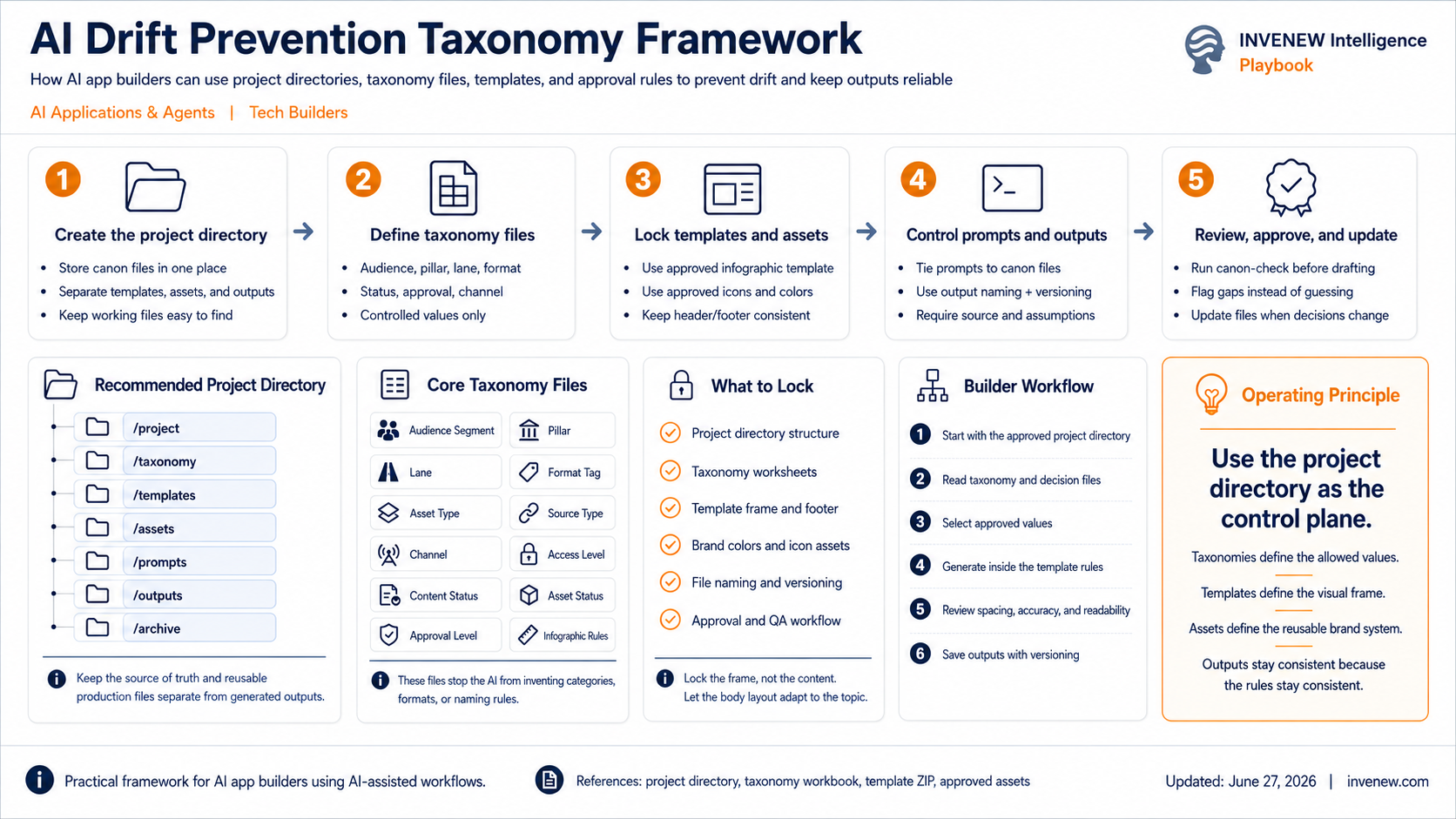
An AI drift prevention taxonomy framework has five operating parts.
1. Define the canon
Start by identifying the files that are allowed to act as source of truth. These may include a decisions log, product requirements, brand guidelines, architecture notes, data definitions, approved terminology, reusable templates, and workflow rules.
The important point is not that all documentation exists. The important point is that the AI knows which documents outrank others.
For INVENEW, the decision log exists specifically to prevent future content, strategy, website, newsletter, LinkedIn, Labs, product, diagram, and AI-agent outputs from contradicting approved decisions. That is the first rule of drift prevention: do not let every file have equal authority.
2. Standardize the core taxonomies
Once the canon is clear, define the controlled values the AI is allowed to use.
At minimum, builders should maintain taxonomies for audience, pillar, lane, format, asset type, source type, channel, status, approval level, and file naming. These are not administrative extras. They are the operating fields that keep outputs consistent across sessions, agents, and tools.
INVENEW’s approved taxonomy model includes audience segments such as Tech Builders, Technical Teams, Workflow Builders & Operators, Product & Business Leaders, Startup & SMB Operators, and Large Business Teams. It also defines Tech Builders as the approved replacement for “AI-Native Builders,” with sub-audiences including technical founders, founder-engineers, startup builders, AI app builders, and AI app developers.
That kind of controlled naming prevents the AI from inventing a new audience label every time it drafts a briefing, diagram, product note, or LinkedIn post.
3. Lock the production rules
Taxonomies control the fields. Templates control the output shape.
For AI builders, this means separating reusable production assets from generated outputs. A project directory should clearly distinguish source-of-truth files, taxonomy files, templates, brand assets, prompts, drafts, final outputs, and archived versions.
The lesson from the infographic work is simple: a prompt cannot reliably preserve layout by itself. A locked template, reusable assets, and clear output rules reduce drift much better than asking the AI to “make it look like last time.”
The same applies to app builders. If an AI workflow generates specs, diagrams, PRDs, issue tickets, release notes, or architecture maps, it needs a consistent output layout and naming convention.
4. Route risky changes through approval
A taxonomy framework is not only about categories. It also needs decision boundaries.
The AI should know which changes it can make freely, which changes require review, and which changes require explicit approval. This is especially important for brand positioning, product scope, pricing, sponsor language, legal claims, regulated topics, vendor comparisons, and public-facing diagrams.
INVENEW’s Master Decisions Log includes an implementation gap rule: if the website, schema, GitHub importer, Beehiiv tags, or automation still uses older allowed values, the AI should not silently downgrade the taxonomy. It should mark the issue as an implementation gap and update the schema or workflow before publishing with new canonical values.
That is a useful rule for any AI app builder: when the system cannot support the canon, flag the gap. Do not improvise around it.
5. Evaluate and update the system
The taxonomy framework should not be static. It should be reviewed as the product, content system, or AI workflow evolves.
Builders should track where drift happens: wrong audience, wrong format, outdated terminology, broken file naming, visual inconsistency, unsupported claims, or unauthorized changes. Each drift event should either confirm the existing canon, update the taxonomy, or create a new approval rule.
This turns drift from a mystery into an operating signal.
The practical stack
For AI app builders, the framework can be organized into a simple project structure:
/project
  /canon
  /taxonomy
  /templates
  /assets
  /prompts
  /outputs
  /archive
The /canon folder holds source-of-truth decisions. The /taxonomy folder holds controlled values. The /templates folder holds reusable layouts and schemas. The /assets folder holds approved logos, icons, colors, and design elements. The /prompts folder holds reusable prompt patterns. The /outputs folder holds generated work. The /archive folder prevents old versions from re-entering active use.
This structure gives the AI a working environment instead of a vague memory.
What this prevents
A good taxonomy framework prevents several common failure modes:
It prevents audience drift, where the same product is written for founders in one draft, enterprise buyers in another, and developers in a third.
It prevents format drift, where a playbook, briefing, research note, and market map blur into the same generic output.
It prevents visual drift, where every infographic has a slightly different header, footer, label, spacing, and style.
It prevents workflow drift, where a draft moves from idea to public output without review.
It prevents schema drift, where the AI uses values that the CMS, importer, or automation does not actually support.
And it prevents decision drift, where an old assumption returns because the AI found it in a prior file or inferred it from memory.
The builder takeaway
The model is not the control plane. The prompt is not the control plane. The project directory, taxonomy files, templates, assets, and approval rules are the control plane.
For AI builders, the operating principle is:
Lock the frame. Control the fields. Let the content vary inside the rules.
That means the AI can still help generate, explain, map, compare, and draft. But it should do that inside a controlled system where approved values, templates, and decisions are known before generation starts.
How to use this
Start with one workflow where drift already happens. It may be content generation, product specs, app diagrams, vendor maps, agent outputs, or release notes.
Create one source-of-truth file, one taxonomy file, one output template, and one review rule. Then require every AI output to check those before generating.
Do not try to govern everything on day one. Start with the fields that drift most often: audience, pillar, lane, format, status, approval, and file naming. Then expand the taxonomy as the workflow becomes more repeatable.
That is how AI-assisted work becomes less like improvisation and more like an operating system.
If this briefing helped you, leave a comment or your reaction. I’d like to hear where you landed.
INVENEW exists to help tech builders, operators, founders, and leaders turn AI from experiments into working systems.
In partnership with
One team cut AI spend by 78% without switching models. They switched gateways. Mesh API: 1000+ models, one endpoint, cheapest routing, per-team token tracking. Estimate Savings.